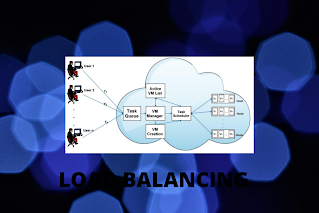
- Network interfaces & services such as DNS, FTP & HTTP.
- Processing through computer system assignment.
- Access to application instances.
- Connection through intelligent switches.
- Resources of storage.
This blog is about basics of Cloud Computing and Virtualization.It contains all the topics related to the title along with the short question answers on the subject which are very helpful to the students.
Thursday, 3 December 2020
LOAD BALANCING IN CLOUD COMPUTING
Monday, 5 October 2020
Steps: How to create your EC2 instance from AWS console?
1) After Sign-in , Welcome to AWS Management Console.
2) Write EC2 in Find services, select it from the list shown.3) This is the page, we get4) Click on instance in from the left panel.
5) Click on Launch instance button.
6)This page is available after that which shows various Amazon Machine Image.
7) In this , "Ubuntu server " is being selected for creating instance. Following page is available from we can choose Free tier instance type.8) Click on Configure Instance Details. Following page is available.(Here default value is selected).9) Then , click on Add Storage(Here, also value taken as default value)
10) Click to Add tag, Following page is available.
11) In the Name column : write "Type" and in value column write: "Demo". The two tick marks of blue color is visible towards right.
12) Then, Click on "Configure Security Group" button.
13)Following page is visible to us:
15) Then, Click on "Review and Launch" button.
16) Following page is seen:
AMI Details
Instance Type
Security Groups
Instance Details
Storage
Tags
18) Then, Click on Launch.
19) The dialog box came, asking for "Selecting an existing key pair or create a new key pair"
21) Download the Key Pair, and Click on "Launch Instance".
22) Finally got the following page:
Tuesday, 29 September 2020
STEPS FOR SETTING UP BILLING ALARM IN AWS CONSOLE
1) Login to AWS Console.
2) AWS MANAGEMENT CONSOLE will be seen like this.
3) At the top right corner where your name is written click on that, from t
hat drop down menu select "MY
BILLING DASHBOARD".
4) Following page will come:
As expenditure is zero so here is 0$.
5) In ALERTS & NOTIFICATION, Click
on "ENABLE NOW".
6) So coming to "BILLING
PREFERENCES", Click on "RECIEVE BILLING ALERTS", then "SAVE
PREFERENCES" BUTTON.
7) After that you are able to see
the link "MANAGE BILLING ALERTS" ,with the "RECIEVE BILLING
ALERTS"; Click on that.
8) It takes you to the "CLOUD
WATCH" service page.
9) On the left side menu is the
alarms section click on that , and then on billing section.
10) It will take you to
"billing alarm" page, set the threshold as for example as "1 USD"
, it will give the notification if you exceed this limit.
11) in a "SEND A
NOTIFICATION TO " box write the email address where the notification
will be mailed .
12) Click on "CREATE ALARM"
button.
13) As soon as you click the alarm
button, it will confirm new email address.
14) Then you have to move to the
email account and click on confirm subscription.
15) It will confirm the subscription
and is shown AWS console also with the green tick mark.
16) Then, Click on VIEW ALARM.
17) Finally an alarm is set, which
states that if the usage goes beyond 1 USD it will notify at a defined email
address.
Sunday, 20 September 2020
Mobile Cloud Computing
"Mobile Cloud Computing" term itself denotes as it is a combination of two concepts that is cloud computing and mobile networks. When the advantages of both merged up we get a new concept known as Mobile Cloud Computing.
This new emerging technology helps to bring benefits for mobile users, network providers, and mobile networks.
Can you imagine, how many people instead of using PCs, preferred to use smart phones for maximum work. This is due to mobile devices are more compact and comfortable to use; and the most important thing is internet is now accessible on mobile devices too.
So, mobile devices are preferred over PC. Even now a days small start ups and businesses are also dependent on these mobile devices. So, if these mobile networks when combine with the cloud computing concepts, the user able to get the infrastructure, platform and software, anywhere, everywhere and anytime.
Main reasons for using this mobile cloud computing are :
1) It helps to easily share the content and assets.
2) It also helps to easily maintain the data
3) It also handles and tolerate the crashes and deletion of data
4) Most important is cloud computing is the main part brain of this concept
In actual terms, Mobile Cloud Computing is the infrastructure where the processing and storage of data is done outside the mobile devices.
Some of the characteristics of mobile cloud computing are:
1) Scalability 2) Reliability 3) Security 4) Reduced cost 5) Reduced Maintenance
Mobile Cloud Computing architecture is as follows:
Tuesday, 21 April 2020
ANATOMY OF CLOUD
Provisioning and Configuration Module:
It is the lowest level of the cloud and generally resides on bare hardware (such as firmware) or at the top of the hypervisor layer. Its function is to abstract the underlying hardware and provide a standard mechanism for generating virtual machine instances on demand. It also handles the post-configuration of operating systems and applications residing on the VM.
This layer handles the monitoring of all services, storage, networking and application components in the cloud. Based on the statistics, it could perform routine functions that optimize the behavior of the infrastructure components and provide relevant data to the cloud administrator to further optimize the configuration for maximum utilization and performance,
Orchestration is central to cloud operations. Orchestration converts requests from the service management layer and the monitoring, chargeback modules to appropriate action items which are then submitted to the provisioning and configuration module for final closure. Orchestration updates the CMDB in the process.
It is a central configuration repository wherein all the metadata and configuration of different modules, resources are kept and updated in a real-time basis. The repository can then be accessed using standards protocols like SOAP by third-party software and integration components. All updates in CMDB happen in real-time as requests get processed in the cloud.
It is central to the definition of cloud, SC defines what kind of services the cloud is capable of providing and at what cost to the end-user. SC is the first thing that is drafted before a cloud is an architecture. The service management layer consults SC before it processes any request for a new resource.
Monday, 24 February 2020
Examples Of Cloud Computing Close To Home.
You've heard about cloud computing and you also know that it is being used more and more in various configurations, however, you may not yet understand exactly what it is. The truth is that you are probably already using some form without even realizing it. Let's take a look at some examples of cloud computing and find out if any of them sound familiar.
If you have heard (or used) of Dropbox, you have used cloud computing. You can place a credit card application for Dropbox on the devices you want, and you can access the files stored in the application from those devices. Someone who concentrates on a document at home can place it in Dropbox and someone from the other side of the world with the same account can pick it up and do whatever they want when using it. Syncplicity is another similar service.
Social networks also use cloud computing. By entering data and photos on the easy-to-use site, you can share it with your friends around the world. Everything is stored within the cloud and is accessed simply by entering your bank account at any time. Of course, your information can also be shared with those who run the service, which may pose privacy and security issues, but many people seem willing to take risks to safeguard the convenience of the service.
There are several hosting services that offer you storage of documents, images, videos along with other information. YouTube, Picasa, and Flikr are also cloud computing services. Google Docs Zoho Office along with a number of others give you the ability to create documents that can be used in collaboration to edit and share.
Email is probably the most used application of cloud computing. When you use a web-based email service, you use that technology. It does not run and store the email program on your PC but allows cloud computers, or even the Internet, to do it for you. It gives you much more storage than you could store on your PC because there is a lot of storage in the back.
Offsite backup services are another example. You can store your data, photos and other data by yourself, but it is also important to have an online backup. Keep a duplicate of everything inside the cloud using services such as Carbonite, JungleDisk or Mozy. This often facilitates access to your data anywhere in the world and protects it against security problems if your computer or storage products are stolen or damaged.
Cloud computing plays a role in many facets of our lives. With an increasing number of uses, it is likely to be only popular in the coming years. Although you will encounter security problems when your data is stored off-site, there is also a long list of benefits that are presented, as clearly seen through these everyday examples of cloud computing.
What Cloud Computing Companies Are Offering?
Tuesday, 11 February 2020
GRID COMPUTING VS CLOUD COMPUTING
Monday, 10 February 2020
5 FREE CLOUD STORAGE FOR SMALL BUSINESSES
You all understand that the exploitation of the cloud will bring great blessings to all low businesses. regularly pay cash in hardware to store your files and applications, why not consider cloud exploitation? Instead of sending documents by email from one place to another, why not store them centrally in the cloud?
From comparatively corporations like Adrive, Box and Dropbox, to heavy Google and Microsoft, several of them use free cloud storage as the easiest way to tempt users in their clouds in the hopes that they pay a lot for Additional volumes and services. Next, there are five high free cloud services that you should understand.
1. GOOGLE DRIVE (FREE 15GB STORAGE)
Google Drive could be file storage and synchronization service created by Google. This service allows users to store files within the cloud, share files and edit documents, spreadsheets and screens with collaborators. Google Drive encompasses Google Docs, Sheets and Slides, a set of associated workplaces that allows cooperative written material for documents, spreadsheets, screens, drawings, forms and more.
2. MICROSOFT ONEDRIVE (FREE STORAGE 15GB)
OneDrive (formerly called SkyDrive, Windows Live SkyDrive and Windows Live Folders) could be cloud storage and file hosting service that allows users to adjust files and access them from an online browser or mobile device later. With this, users will share files publicly or with their contacts, publicly shared files do not need a Microsoft account to access. It is part of the set of online services known as Windows Live.
3. ADRIVE (FREE 50GB STORAGE WITH ADAPTED AD)
ADrive provides online cloud storage services for clients, United Nations agencies, individuals, businesses and business-level users. Its objective is to offer users a convenient and reliable service thanks to greater management of their knowledge from almost anywhere at any time. From the moment it was absolutely based in 2007 by veterans of the storage and network trade, ADrive was created to meet the stress of our data-intensive world. From the beginning, it is the web storage business giving the freest storage and backup on the web.
4. BOX (FREE STORAGE 10GB WITH TRANSFER SIZE OF 250 FILES)
Box (formerly Box.net) is an Internet file sharing and private cloud content management service for businesses. The company adopted a freemium business model and provides up to ten GB of free storage for private accounts.
5. DROPBOX (FREE STORAGE 2GB)
Dropbox could be a file hosting service operated by Dropbox, Inc. in the city of California, which offers cloud storage, file synchronization, personal cloud, and buyer package. Dropbox provides users to make a special folder on their computers, which Dropbox synchronizes to look like a similar folder (with similar content) despite what PC is used to look at it. Files placed during this folder are also accessible through the Dropbox website and mobile applications.
Wednesday, 15 January 2020
How to find the score of your machine ?
2) It will open the command prompt with the black screen.
3) Go to the directory C:\Windows\System 32>
4) Write the command "winsat prepop"
If this doesn't work, then you can try for "winsat formal"
4) This command will run
5)Next, open a PowerShell command prompt, and write the command "Get-WmiObject -class Win32_WinSAT".
The output is as follows:
Finally, you get the score of the machine.
Note: If the command "Get-WmiObject -class Win32_WinSAT " , this doesn't work then write "powershell -command" before "Get-WmiObject -class Win32_WinSAT ".
Cloud Computing
Virtualization
Score based Workflow Scheduling Algorithm
2) Next Step, is to avail the virtual machines V1, V2,...Vn.
3) Assign the deadline to the Workflow tasks.
4) Find the score of the virtual machine,
where
A score of the Virtual Machine=min(Subscore of processor, Subscore of RAM, Subscore of Disk)
5) Check the list of tasks, as if there are any jobs to schedule.
If yes repeat the next three steps, else return the mapping of resources to tasks.
6) Select the least score VM from the list of the Virtual Machines that fulfills task's threshold, where threshold is defined is based on the instruction length of the task.
7) Now, the selected VM is used to execute the task which has defined deadline, so, if VM is able to execute the task within the defined deadline, then that task is allocated to VM, else new VM is selected which has the least score from the set of the resources.
8) The next task is selected from the list.If all tasks are organized then their mapping to VMs is returned for the simulation.
Cloud Computing
Virtualization
Tuesday, 7 January 2020
What is Cloud Computing?
The best example to understand the concept of cloud computing is that electricity returns to our homes and is measured by the meters. For the abuse of electricity, there are completely different square measurement sockets and switches. Every time we would like to charge our mobile phones, use the microwave or use an electric refrigerator, etc., they use electricity according to the device. Therefore, the bill includes accordingly, the devices use electricity.
In the same method, Cloud Computing is that model on-demand to provide services within the type of infrastructure as a service, platform as a service and software systems as a service. Then, regardless of the user's use within the amount of their time, the cloud provider can send the invoice to the user accordingly.
2) Service catalog order: The service catalog can be a document that shows the offers of companies for users, which is managed and maintained by the catalog administrator or administrator.
3) Measurement and billing: One of the main vital attributes is that the activity, regardless of the services used by the user; it must be measured so that the service provider charges it according to the use.
4) Elastic Scaling: According to user requirements, resources are often rescaled and reduced.
5) Rapid Provisioning: In Cloud computing, the user obtains resources or services in just one click do not have to move here and there for the services.
Featured Post
LOAD BALANCING IN CLOUD COMPUTING
Cloud Computing is an IT paradigm where there are number of Cloud Pr...
-
A physical machine can be converted to (VM)Virtual Machine using VMware vCenter Converter Standalone . Following are the steps to inst...
-
Based on the delivery models Cloud can be classified into four major categories: 1) IaaS (Infrastructure as a Service) 2) PaaS (Platfo...
-
Advantages 1) Cost-saving: As the number of physical servers reduces due to the deployment of a number of virtual servers on the ...